
To install ApplyOnline plugin, follow these common steps to install a plugin from the wordpress.org repository.
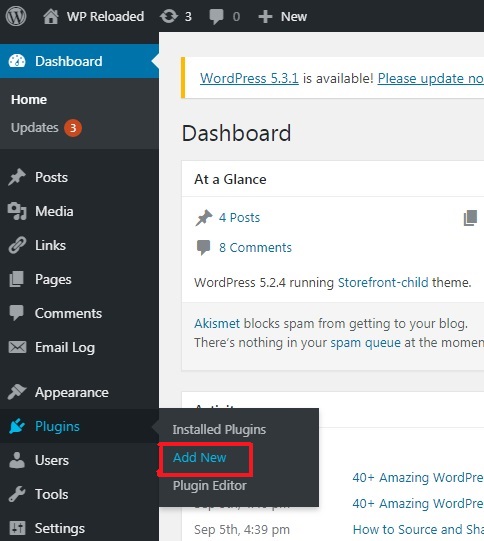
- Log in to your WordPress website admin panel, and click ‘Plugins’ on the left side bar.
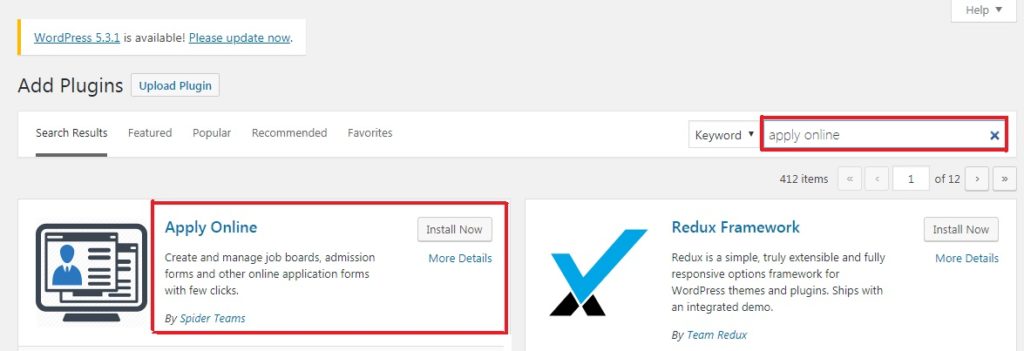
- Click on ‘Add New’, then type ‘Apply Online’ in keyword field and you will find Apply Online plugin ready to be installed along with many others.
- Click ‘Install Now’ button and then click ‘Activate’ button (Activate button appears after installation),
- Now you can see Apply Online installed in ‘Installed Plugins’ section. You can just follow the direction in below images to get it installed.
Now you are ready to create ads. After you have activated the plugin, locate the menu ‘All Ads’ in admin panel and create a few ads.
You can access your ads on front-end by 2 methods: direct URL method and shortcode method
Direct URL Method
This is the most easiest method & do not require much effort. Open link on your website with ads slug i.e. yourdomain.com/ads and see all your ads at one location.
Shortcode Method
This is the recommended method. Follow given steps to beautifully showcase your ads on a WordPress page.
- From WordPress admin panel, create/add a new page to showcase your ads on it.
- Give it a nice title such as: Careers, Jobs or Admissions.
- Place [aol] shortcode in the page editor and let the magic begin.
Isn’t it so easy ?